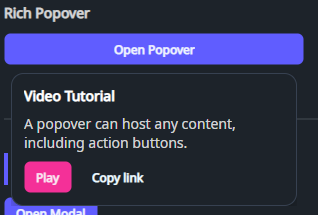
DaisyPopover is a lightweight popover control that hosts content inside a Popup anchored to a trigger. It's useful for rich tooltips, small forms, contextual menus, and “more actions” surfaces.
| Property | Description |
|---|---|
TriggerContent (object?) |
Content shown as the trigger (e.g. a button or icon). |
PopoverContent (object?) |
Content hosted inside the popup. |
IsOpen (bool) |
Controls whether the popover is open. |
Placement (DaisyPopoverPlacement) |
Requested position relative to the trigger: Top, Bottom, Left, or Right (default Bottom). |
HorizontalOffset (double) |
Horizontal popup offset (default 0). |
VerticalOffset (double) |
Vertical popup offset (default 8). |
IsLightDismissEnabled (bool) |
Closes the popover when clicking outside (default true). |
ToggleOnClick (bool) |
When true, clicking the trigger toggles IsOpen (default true). |
Native popup placement constrains the popup to the XamlRoot bounds. Near a window edge, it can choose a different position from the requested Placement. The popup size is limited to the root width and height.
Changes to Placement, HorizontalOffset, and VerticalOffset update the requested position while the popover is open. Root size changes also update the popup limits.
Positive HorizontalOffset moves the popup left for Left, and right for the other placements. Positive VerticalOffset moves it up for Top, and down for the other placements.
<!-- Toggle popover on click -->
<controls:DaisyPopover>
    <controls:DaisyPopover.TriggerContent>
        <controls:DaisyButton Content="Open" Variant="Primary" />
    </controls:DaisyPopover.TriggerContent>
    <controls:DaisyPopover.PopoverContent>
        <StackPanel Spacing="8" Width="240">
            <TextBlock Text="Popover" FontWeight="SemiBold" />
            <TextBlock Text="This content is hosted inside a Popup." Opacity="0.8" TextWrapping="Wrap" />
            <controls:DaisyButton Content="Action" Size="Small" Variant="Secondary" />
        </StackPanel>
    </controls:DaisyPopover.PopoverContent>
</controls:DaisyPopover>

<!-- Programmatic control -->
<controls:DaisyPopover ToggleOnClick="False"
                      IsOpen="{Binding IsHelpOpen}"
                      Placement="Bottom">
    <controls:DaisyPopover.TriggerContent>
        <controls:DaisyButton Content="Help" ButtonStyle="Outline" />
    </controls:DaisyPopover.TriggerContent>
    <controls:DaisyPopover.PopoverContent>
        <TextBlock Text="Help content" />
    </controls:DaisyPopover.PopoverContent>
</controls:DaisyPopover>Placement to request the side of the trigger for the popup.ToggleOnClick="False" when you want to fully control the open state via binding or code.DaisyDropdown can be a more specialized choice.