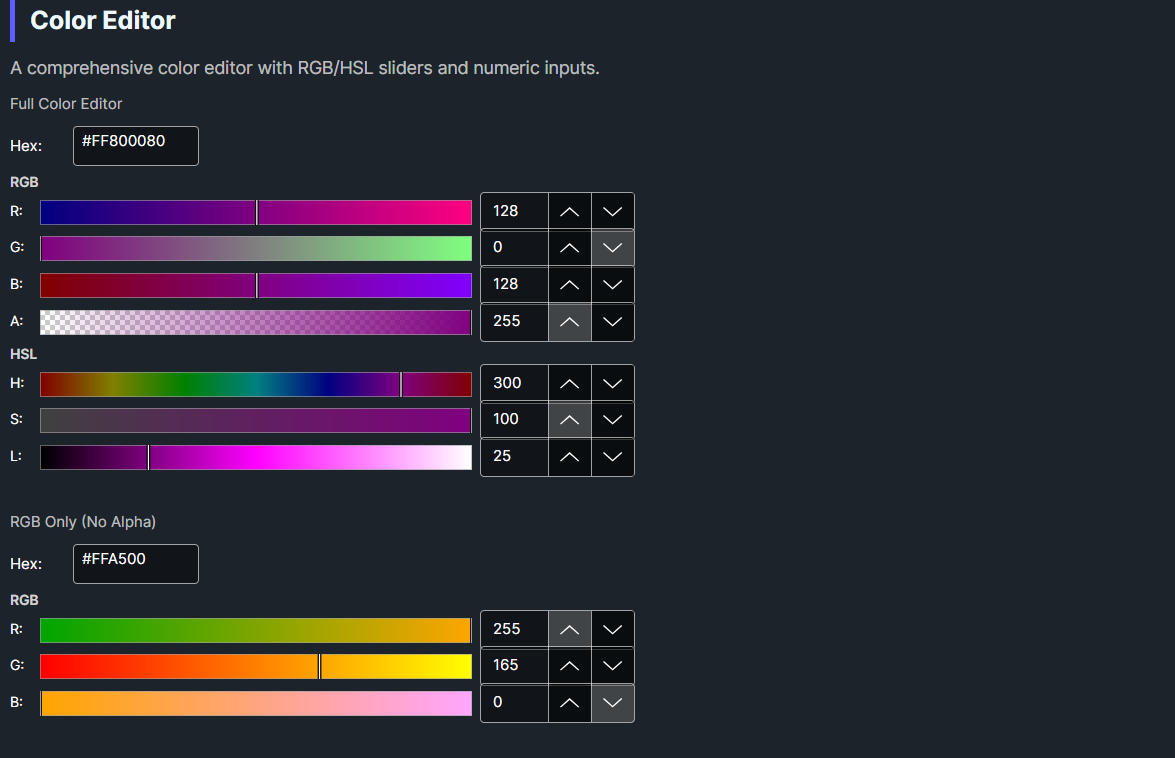
DaisyColorEditor is a comprehensive color editing control that combines RGB and HSL sliders with numeric inputs and a hex color field. It provides precise color manipulation through multiple input methods, making it ideal for professional color selection interfaces.
This is a standalone control with its own XAML theme (DaisyColorEditor.xaml). It can be used independently or as part of DaisyColorPickerDialog. When used in the dialog:
DaisyColorEditor.xamlDaisyColorPickerDialog.cs| Property | Type | Default | Description |
|---|---|---|---|
Color |
Color |
Red |
The selected RGB color |
HslColor |
HslColor |
H:0, S:1, L:0.5 |
The HSL representation |
EditingMode |
ColorEditingMode |
Rgb |
Preferred section: RGB or HSL. See Editing Modes. |
ShowAlphaChannel |
bool |
true |
Show alpha channel controls |
ShowHexInput |
bool |
true |
Show hex color input field |
ShowRgbSliders |
bool |
true |
Allows the RGB section. EditingMode selects between enabled sections. |
ShowHslSliders |
bool |
true |
Allows the HSL section. EditingMode selects between enabled sections. |
OnColorChangedCallback |
Action |
null |
Optional callback when color changes |
| Property | Type | Range | Description |
|---|---|---|---|
Red |
byte |
0-255 | Red component |
Green |
byte |
0-255 | Green component |
Blue |
byte |
0-255 | Blue component |
Alpha |
byte |
0-255 | Alpha component |
Hue |
double |
0-359 | Hue in degrees |
Saturation |
double |
0-100 | Saturation percentage |
Lightness |
double |
0-100 | Lightness percentage |
HexValue |
string? |
- | Hex color string (e.g., "#FF0000") |
The ColorEditingMode enum selects the preferred section:
| Mode | Description |
|---|---|
Rgb |
Red, Green, Blue sliders and inputs |
Hsl |
Hue, Saturation, Lightness sliders and inputs |
When both slider flags are True, EditingMode selects the visible section. The default mode is Rgb.
When the selected section is disabled, the editor shows the other enabled section. When both flags are False, neither section appears. The visible section updates immediately after an EditingMode change.
editor.ColorChanged += (sender, e) =>
{
    Console.WriteLine($"New color: {e.Color}");
    Console.WriteLine($"Hex: #{e.Color.R:X2}{e.Color.G:X2}{e.Color.B:X2}");
};<colorpicker:DaisyColorEditor
OnColorChangedCallback="{Binding HandleEditorColorChanged}" />var editor = new DaisyColorEditor
{
ShowAlphaChannel = true,
OnColorChangedCallback = color =>
{
Debug.WriteLine($"Selected: {color}");
}
};<!-- Full-featured editor -->
<colorpicker:DaisyColorEditor
Color="{Binding SelectedColor, Mode=TwoWay}"
ShowAlphaChannel="True"
ShowHexInput="True"
ShowRgbSliders="True"
ShowHslSliders="True" />
<!-- RGB only (no HSL) -->
<colorpicker:DaisyColorEditor
Color="{Binding SelectedColor, Mode=TwoWay}"
ShowHslSliders="False" />
<!-- HSL only (no RGB) -->
<colorpicker:DaisyColorEditor
Color="{Binding SelectedColor, Mode=TwoWay}"
ShowRgbSliders="False"
EditingMode="Hsl" />
<!-- Compact: just hex input -->
<colorpicker:DaisyColorEditor
Color="{Binding SelectedColor, Mode=TwoWay}"
ShowRgbSliders="False"
ShowHslSliders="False"
ShowAlphaChannel="False" />
<!-- No alpha channel -->
<colorpicker:DaisyColorEditor
Color="{Binding SelectedColor, Mode=TwoWay}"
ShowAlphaChannel="False" />
<!-- With callback -->
<colorpicker:DaisyColorEditor
OnColorChangedCallback="{Binding OnEditorColorChanged}" />The control uses named template parts for its UI elements:
| Part Name | Type | Purpose |
|---|---|---|
PART_RedSlider |
DaisyColorSlider |
Red channel slider |
PART_GreenSlider |
DaisyColorSlider |
Green channel slider |
PART_BlueSlider |
DaisyColorSlider |
Blue channel slider |
PART_AlphaSlider |
DaisyColorSlider |
Alpha channel slider |
PART_HueSlider |
DaisyColorSlider |
Hue channel slider |
PART_SaturationSlider |
DaisyColorSlider |
Saturation channel slider |
PART_LightnessSlider |
DaisyColorSlider |
Lightness channel slider |
PART_RedInput |
NumericUpDown |
Red numeric input |
PART_GreenInput |
NumericUpDown |
Green numeric input |
PART_BlueInput |
NumericUpDown |
Blue numeric input |
PART_AlphaInput |
NumericUpDown |
Alpha numeric input |
PART_HueInput |
NumericUpDown |
Hue numeric input |
PART_SaturationInput |
NumericUpDown |
Saturation numeric input |
PART_LightnessInput |
NumericUpDown |
Lightness numeric input |
PART_HexInput |
TextBox |
Hex color input |
ShowAlphaChannel when transparency is not needed.#RGB, #RRGGBB, #AARRGGBB.OnColorChangedCallback for simple handlers; use ColorChanged event for multiple subscribers.DaisyColorWheel for a complete color picker interface.This control is part of the Flowery.WinUI color picker suite, inspired by the Cyotek ColorPicker library (MIT License).