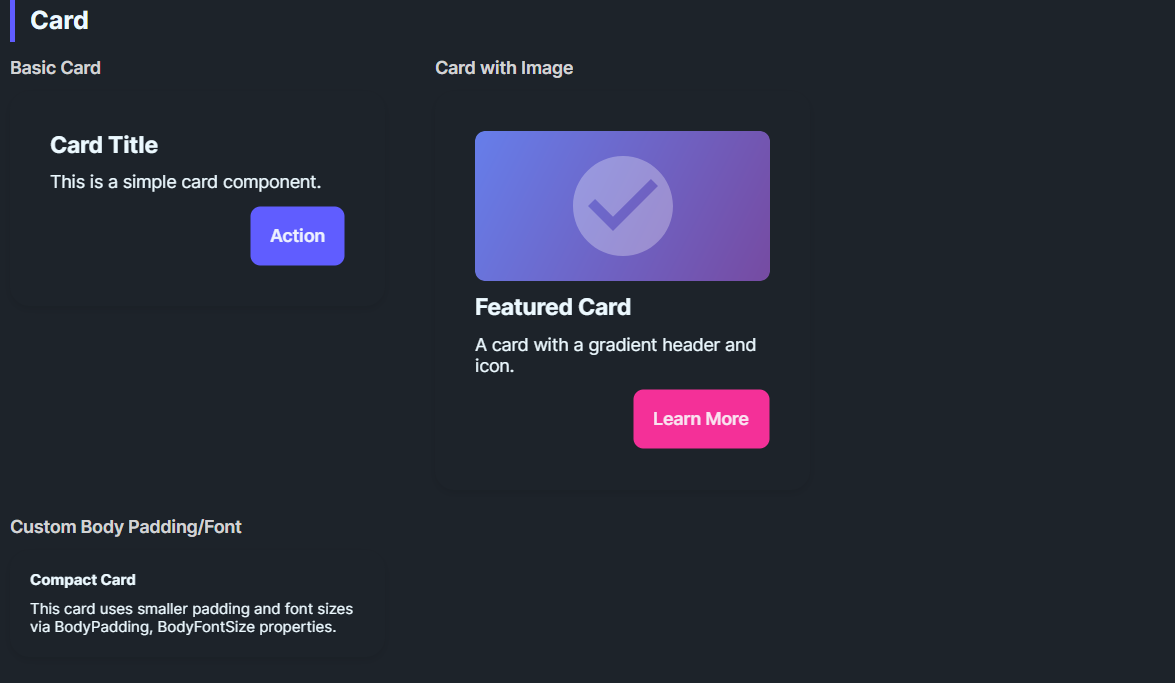
DaisyCard provides a panel for grouping content with padding, rounded corners, and optional glass effects. It supports 3 layout variants (Normal, Compact, Side), color variants for semantic styling, configurable body/title typography, and an opt-in glassmorphism stack with tint/blur controls. You can also use the built-in header API (Title/Description/Icon) for a ready-made card layout. Use it for dashboards, feature tiles, or content groupings; compose headers, bodies, and action rows inside.
| Variant | Description |
|---|---|
| Normal (default) | Size-dependent padding (32 at Medium) and 16px corner radius. |
| Compact | Reduced size-dependent padding (16 at Medium) for dense layouts or nested cards. |
| Side | Reserved for side-by-side card styling; currently matches Normal styling. |
Use ColorVariant to apply semantic palette colors:
| ColorVariant | Background | Foreground |
|---|---|---|
| Default | Base100 (or custom) | BaseContent (auto-detected) |
| Primary | DaisyPrimaryBrush | DaisyPrimaryContentBrush |
| Secondary | DaisySecondaryBrush | DaisySecondaryContentBrush |
| Accent | DaisyAccentBrush | DaisyAccentContentBrush |
| Neutral | DaisyNeutralBrush | DaisyNeutralContentBrush |
| Info | DaisyInfoBrush | DaisyInfoContentBrush |
| Success | DaisySuccessBrush | DaisySuccessContentBrush |
| Warning | DaisyWarningBrush | DaisyWarningContentBrush |
| Error | DaisyErrorBrush | DaisyErrorContentBrush |
| Base200 | DaisyBase200Brush | DaisyBaseContentBrush |
| Base300 | DaisyBase300Brush | DaisyBaseContentBrush |
When you set a custom Background using a Daisy palette brush, the card automatically detects the matching foreground color. No need to manually set Foreground on child elements!
<!-- Auto-foreground detection - Foreground is automatically set to DaisyPrimaryContentBrush -->
<controls:DaisyCard Background="{ThemeResource DaisyPrimaryBrush}">
    <TextBlock Text="Hello World"/>  <!-- Inherits correct foreground automatically -->
</controls:DaisyCard>

<!-- Equivalent to (but more concise): -->
<controls:DaisyCard ColorVariant="Primary">
    <TextBlock Text="Hello World"/>
</controls:DaisyCard>
This feature:
Foreground settings if you need to overrideDaisyPatternedCard renders its pattern using the card Foreground when PatternMode="Tiled". In SvgAsset mode, the pattern assets are chosen as black or white based on the active theme. If patterns disappear on some themes, use one of these approaches:
PatternMode="Tiled" and provide a high-contrast Foreground so the pattern tint stays visible.DaisyCardBackground and DaisyCardForeground in the card's Resources (keeps the sample or one instance theme-independent).SvgAsset mode and ensure the card background contrasts with the theme's black/white assets.TextBlock style or explicit Foreground in the card content.<controls:DaisyPatternedCard Pattern="Grid" PatternMode="Tiled" Foreground="White" Background="Black">
<TextBlock Text="Fixed colors, theme-independent pattern." />
</controls:DaisyPatternedCard>| Property | Description |
|---|---|
IsGlass |
Switches to the layered glass template (tinted + gradients + inner shine). Disables the drop shadow. |
GlassBlur |
Blur intensity for the frosted look (default 40). |
GlassOpacity |
Opacity of the base tint layer (default 0.3). |
GlassTint / GlassTintOpacity |
Tint color and its opacity (defaults: White, 0.5). |
GlassBorderOpacity |
Alpha for the outer border (default 0.2). |
EnableBackdropBlur |
Enables real backdrop blur using Skia (performance intensive). |
BlurMode |
Blur rendering mode: Simulated, BitmapCapture, or SkiaSharp. |
GlassSaturation |
Saturation of blur (0.0 = grayscale, 1.0 = normal). |
In a Windows contrast theme, the card uses an opaque system-colored surface and a visible border.
Blur captures, tint overlays, reflections, and decorative shadows are disabled.
The original glass settings apply again after Windows contrast mode ends.
This behavior also applies to derived patterned and expandable cards.
| Property | Description |
|---|---|
BodyPadding |
Content padding. Follows Size and Variant until the application sets a local value. |
BodyFontSize |
Default body text size for custom layouts (default 14). |
TitleFontSize |
Default title text size for custom layouts (default 20). |
These values apply to all four sides, in device-independent pixels:
| Size | Normal / Side | Compact |
|---|---|---|
| ExtraSmall | 16 | 8 |
| Small | 24 | 12 |
| Medium | 32 | 16 |
| Large | 40 | 20 |
| ExtraLarge | 48 | 24 |
Changing Size or Variant updates automatic padding.
A local BodyPadding value remains unchanged during these updates.
Call card.ClearValue(DaisyCard.BodyPaddingProperty) to restore automatic padding for the current size and variant.
Set these properties to get a ready-made header (icon + title + description) without custom XAML. Any Content you provide renders below the description.
| Property | Description |
|---|---|
Title |
Header title text. |
Description |
Body description text. |
IconImageSource |
Icon image source for the header. |
IconBackground |
Background brush for the icon container. |
IconBorderBrush |
Border brush for the icon container. |
IconSize |
Icon container size (default 56). |
<controls:DaisyCard Title="Launch Plan"
                    Description="Ready to ship this release. Confirm the checklist and roll out."
                    IconImageSource="{x:Bind ViewModel.LaunchIcon}"
                    IconBackground="{ThemeResource DaisyBase200Brush}"
                    IconBorderBrush="{ThemeResource DaisyBase300Brush}">
    <controls:DaisyButton Content="Open" Variant="Primary" HorizontalAlignment="Right" />
</controls:DaisyCard>Place any layout/content inside the card; common patterns:
<!-- Standard card -->
<controls:DaisyCard>
    <StackPanel Spacing="10">
        <TextBlock Text="Card Title" FontWeight="SemiBold" FontSize="18" />
        <TextBlock Text="Supporting description goes here." TextWrapping="Wrap" />
        <StackPanel Orientation="Horizontal" Spacing="8">
            <controls:DaisyButton Content="Action" Variant="Primary" />
            <controls:DaisyButton Content="Secondary" Variant="Ghost" />
        </StackPanel>
    </StackPanel>
</controls:DaisyCard>

<!-- Color variant card -->
<controls:DaisyCard ColorVariant="Primary">
    <StackPanel Spacing="6">
        <TextBlock Text="Primary Card" FontWeight="Bold" />
        <TextBlock Text="Uses DaisyPrimaryBrush background with auto foreground." />
    </StackPanel>
</controls:DaisyCard>

<!-- Custom background with auto-foreground -->
<controls:DaisyCard Background="{ThemeResource DaisySuccessBrush}">
    <StackPanel Spacing="6">
        <TextBlock Text="Success Card" FontWeight="Bold" />
        <TextBlock Text="Foreground auto-detected from background!" />
    </StackPanel>
</controls:DaisyCard>

<!-- Compact card -->
<controls:DaisyCard Variant="Compact">
    <StackPanel Spacing="6">
        <TextBlock Text="Compact Card" FontWeight="Bold" />
        <TextBlock Text="Tighter padding for dense layouts." />
    </StackPanel>
</controls:DaisyCard>

<!-- Glass card -->
<controls:DaisyCard IsGlass="True" Width="260">
    <StackPanel Spacing="8">
        <TextBlock Text="Glass Card" FontWeight="Bold" FontSize="18" />
        <TextBlock Text="Subtle tint with frosted layers." TextWrapping="Wrap" />
    </StackPanel>
</controls:DaisyCard>

<!-- Glass with custom tint -->
<controls:DaisyCard IsGlass="True" GlassTint="#000000" GlassOpacity="0.4" GlassTintOpacity="0.6" Width="260">
    <StackPanel Spacing="8">
        <TextBlock Text="Dark Glass" FontWeight="Bold" />
        <TextBlock Text="Higher tint opacity for contrast." TextWrapping="Wrap" />
    </StackPanel>
</controls:DaisyCard>

<!-- Real blur glass card -->
<controls:DaisyCard IsGlass="True" EnableBackdropBlur="True" BlurMode="SkiaSharp"
                    GlassBlur="30" GlassSaturation="0.8" Width="260">
    <StackPanel Spacing="8">
        <TextBlock Text="Skia Blur" FontWeight="Bold" FontSize="18" />
        <TextBlock Text="Real backdrop blur effect." TextWrapping="Wrap" />
    </StackPanel>
</controls:DaisyCard>ColorVariant for semantic coloring - it's the cleanest approach.Background, the card auto-detects and applies matching foreground.EnableBackdropBlur="True" with BlurMode="SkiaSharp" or BlurMode="BitmapCapture".BodyPadding for edge-to-edge media (e.g., set to 0 and pad inner content manually).Width or use layout constraints for uniform card grids.