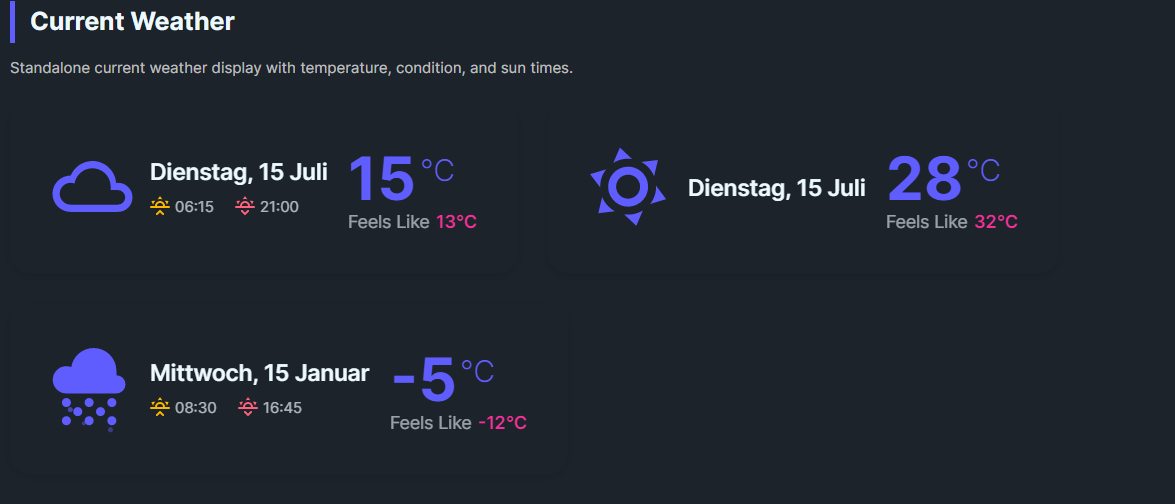
DaisyWeatherCurrent is a standalone widget for showing the current weather state. It features a large animated weather icon, prominent temperature display, and supporting information like "feels like" and sun times.
| Property | Type | Default | Description |
|---|---|---|---|
Temperature |
double |
0 |
Current temperature value |
FeelsLike |
double |
0 |
"Feels like" temperature |
Condition |
WeatherCondition |
Unknown |
Weather condition for icon |
Date |
DateTime |
DateTime.Now |
Date/time of reading |
Sunrise |
TimeSpan |
- | Sunrise time (e.g., 07:33) |
Sunset |
TimeSpan |
- | Sunset time (e.g., 17:20) |
TemperatureUnit |
string |
"C" |
Temperature unit (C or F) |
ShowSunTimes |
bool |
true |
Whether to show sunrise/sunset |
<!-- Basic usage -->
<controls:DaisyWeatherCurrent
    Temperature="22"
    FeelsLike="24"
    Condition="Sunny"
    TemperatureUnit="C" />

<!-- With sun times -->
<controls:DaisyWeatherCurrent
    Temperature="8"
    FeelsLike="5"
    Condition="PartlyCloudy"
    Sunrise="07:33"
    Sunset="17:20" />

<!-- Fahrenheit -->
<controls:DaisyWeatherCurrent
    Temperature="72"
    FeelsLike="75"
    Condition="Clear"
    TemperatureUnit="F" />

<!-- Hide sun times -->
<controls:DaisyWeatherCurrent
    Temperature="15"
    Condition="Cloudy"
    ShowSunTimes="False" />

<!-- With data binding -->
<controls:DaisyWeatherCurrent
    Temperature="{Binding CurrentTemperature}"
    FeelsLike="{Binding FeelsLikeTemperature}"
    Condition="{Binding CurrentCondition}"
    Date="{Binding LastUpdated}"
    Sunrise="{Binding SunriseTime}"
Sunset="{Binding SunsetTime}" />The control displays in a three-column layout:
1. Left: Large animated weather condition icon (64px)
2. Center: Date and sun times (sunrise ☀️↑ / sunset ☀️↓)
3. Right: Temperature with unit and "Feels like" value
The control uses theme brushes:
DaisyPrimaryBrushDaisySecondaryBrushDaisyBaseContentBrushDaisyWarningBrushDaisyErrorBrush