> Added in v1.0.8
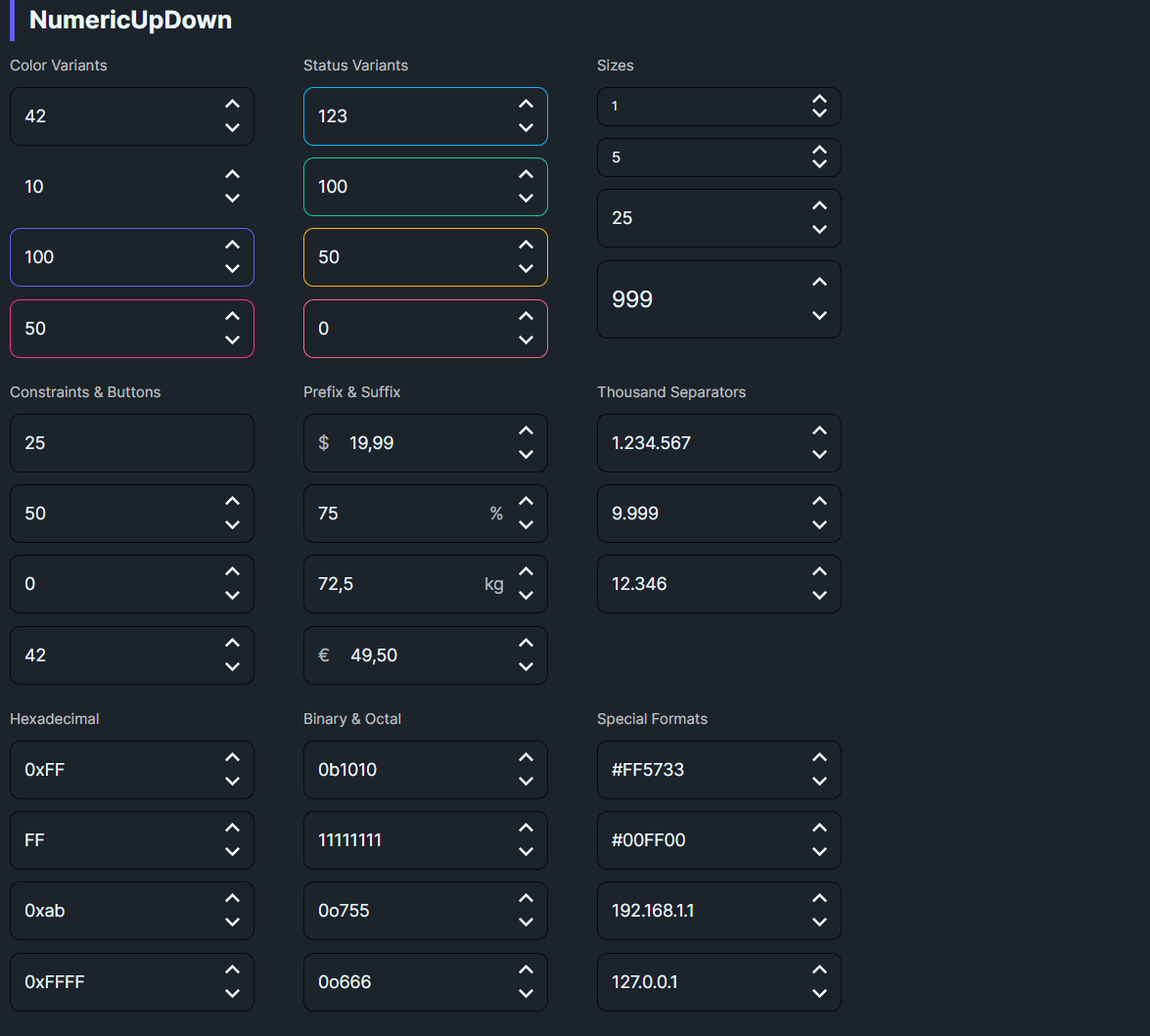
DaisyNumericUpDown is a numeric input control that extends Avalonia's NumericUpDown with DaisyUI styling. It provides increment/decrement buttons (spin buttons) for adjusting numeric values, along with direct text entry support. The control follows the same visual style and variant system as DaisyInput.
1,234,567)1e5, 2.5E-3)| Variant | Description |
|---|---|
| Bordered | Default style with neutral border |
| Ghost | Transparent background, shows on focus |
| Primary | Primary color border |
| Secondary | Secondary color border |
| Accent | Accent color border |
| Info | Info color border |
| Success | Success/green color border |
| Warning | Warning/yellow color border |
| Error | Error/red color border |
| Size | Height | Use Case |
|---|---|---|
| ExtraSmall | 24px | Compact tables, dense UIs |
| Small | 32px | Secondary inputs |
| Medium | 48px | General purpose (default) |
| Large | 64px | Primary inputs, touch targets |
> Note: Value is always specified in decimal in XAML. The control displays the value in the selected notation (hex, binary, etc.) at runtime. For example, Value="255" with NumberBase="Hexadecimal" displays as 0xFF.
<!-- Basic usage -->
<controls:DaisyNumericUpDown Value="42" />

<!-- With constraints -->
<controls:DaisyNumericUpDown
    Minimum="0"
    Maximum="100"
    Increment="5"
    Value="50" />

<!-- Currency formatting -->
<controls:DaisyNumericUpDown
    FormatString="C2"
    Value="19.99" />

<!-- Percentage formatting -->
<controls:DaisyNumericUpDown
    FormatString="P0"
    Value="0.75"
    Increment="0.05" />

<!-- Without spin buttons -->
<controls:DaisyNumericUpDown
    ShowButtons="False"
    Value="100" />

<!-- With variant and size -->
<controls:DaisyNumericUpDown
    Variant="Primary"
    Size="Large"
    Value="999" />

<!-- With clear button (appears on focus, resets to 0) -->
<controls:DaisyNumericUpDown
    ShowClearButton="True"
    Value="123" />

<!-- Thousand separators (displays "1,234,567") -->
<controls:DaisyNumericUpDown
    ShowThousandSeparators="True"
    Value="1234567" />

<!-- Hexadecimal (displays "0xFF") -->
<controls:DaisyNumericUpDown
    NumberBase="Hexadecimal"
    Value="255" />

<!-- Binary (displays "0b1010") -->
<controls:DaisyNumericUpDown
    NumberBase="Binary"
    Value="10" />

<!-- Hex without prefix -->
<controls:DaisyNumericUpDown
    NumberBase="Hexadecimal"
    ShowBasePrefix="False"
    Value="255" />

<!-- Hex lowercase (displays "0xab", auto-cases input) -->
<controls:DaisyNumericUpDown
    NumberBase="Hexadecimal"
    HexCase="Lower"
    Value="171" />

<!-- Octal (displays "0o755" - Unix permissions!) -->
<controls:DaisyNumericUpDown
    NumberBase="Octal"
    Value="493" />

<!-- Color hex (displays "#FF5733", padded to 6 digits) -->
<controls:DaisyNumericUpDown
    NumberBase="ColorHex"
    Value="16734003" />

<!-- IPv4 address (displays "192.168.1.1", validates octets) -->
<controls:DaisyNumericUpDown
    NumberBase="IPAddress"
    Value="3232235777" />

<!-- Currency with fixed prefix (doesn't interfere with editing) -->
<controls:DaisyNumericUpDown
    Prefix="$"
    FormatString="N2"
    Value="19.99" />

<!-- Percentage with fixed suffix -->
<controls:DaisyNumericUpDown
    Suffix="%"
    Minimum="0"
    Maximum="100"
    Value="75" />

<!-- Weight with unit suffix -->
<controls:DaisyNumericUpDown
    Suffix="kg"
    FormatString="N1"
    Value="72.5" />

<!-- Currency with limited decimal places (max 2) -->
<controls:DaisyNumericUpDown
    Prefix="$"
    MaxDecimalPlaces="2"
    FormatString="N2"
    Value="19.99" />

<!-- Phone/PIN input (max 4 digits, no decimals) -->
<controls:DaisyNumericUpDown
    MaxIntegerDigits="4"
    MaxDecimalPlaces="0"
Value="1234" />| Property | Type | Default | Description |
|---|---|---|---|
Value |
decimal? | null | The current numeric value |
Minimum |
decimal | decimal.MinValue | Minimum allowed value |
Maximum |
decimal | decimal.MaxValue | Maximum allowed value |
Increment |
decimal | 1 | Step value for increment/decrement |
FormatString |
string | "0" | .NET format string (e.g., "C2", "P0", "N2"). Default shows integers. |
NumberBase |
DaisyNumberBase | Decimal | Number base: Decimal, Hexadecimal, Binary, Octal, or ColorHex |
ShowThousandSeparators |
bool | false | Display thousand separators (locale-aware, e.g., 1,234,567) |
ShowBasePrefix |
bool | true | Show 0x for hex, 0b for binary |
HexCase |
DaisyHexCase | Upper | Letter case for hex digits: Upper (0xFF) or Lower (0xff). Auto-cases input. |
MaxDecimalPlaces |
int | -1 | Max decimal places for Decimal mode. -1 = default (6 places). |
MaxIntegerDigits |
int | -1 | Max integer digits for Decimal mode. -1 = default (15 digits). |
ShowInputError |
bool | true | Show visual error flash on invalid input. |
InputErrorDuration |
int | 150 | Duration in ms for the error flash. |
Prefix |
string | null | Fixed text displayed on the left (e.g., "$", "€") |
Suffix |
string | null | Fixed text displayed on the right (e.g., "%", "kg") |
Watermark |
string | null | Placeholder text when empty |
Variant |
DaisyInputVariant | Bordered | Visual style variant |
Size |
DaisySize | Medium | Control size |
ShowButtons |
bool | true | Show/hide spin buttons |
ShowClearButton |
bool | false | Show clear button on left when focused (resets to 0) |
IsReadOnly |
bool | false | Prevent editing |
The control provides helper methods to get the value in different notations at runtime:
// Get value as hex string
string? hex = myInput.ToHexString();                 // "0xFF"
string? hexNoPrefix = myInput.ToHexString(false);    // "FF"

// Get value as binary string
string? bin = myInput.ToBinaryString();              // "0b11111111"
string? binNoPrefix = myInput.ToBinaryString(false); // "11111111"

// Get value as octal string
string? oct = myInput.ToOctalString();               // "0o755"
string? octNoPrefix = myInput.ToOctalString(false);  // "755"

// Get value as color hex string (6-digit padded)
string? color = myInput.ToColorHexString();          // "#FF5733"
string? colorNoPrefix = myInput.ToColorHexString(false); // "FF5733"

// Get value as IPv4 address string
string? ip = myInput.ToIPAddressString();             // "192.168.1.1"

// Get value formatted according to current NumberBase setting
string? formatted = myInput.ToFormattedString(); // Uses current NumberBase| Method | Returns | Example |
|---|---|---|
ToHexString(includePrefix) |
Hex string respecting HexCase |
"0xFF" or "0xff" |
ToBinaryString(includePrefix) |
Binary string | "0b1010" |
ToIPAddressString() |
IPv4 address string | "192.168.1.1" |
ToOctalString(includePrefix) |
Octal string | "0o755" |
ToColorHexString(includePrefix) |
6-digit padded color hex | "#FF5733" |
ToFormattedString(includePrefix) |
String based on current NumberBase |
Varies |
For scenarios where you need to convert values in a ViewModel without access to the control instance, use DecimalExtensions:
using Flowery.Extensions;

// Convert decimal to various notations
decimal value = 255m;
string hex = value.ToHexString();             // "0xFF"
string binary = value.ToBinaryString();       // "0b11111111"
string octal = value.ToOctalString();         // "0o377"

decimal colorValue = 16734003m;
string color = colorValue.ToColorHexString(); // "#FF5733"

decimal ipValue = 3232235777m;
string ip = ipValue.ToIPAddressString();      // "192.168.1.1"

// Parse strings back to decimal
decimal fromHex = DecimalExtensions.FromHexString("0xFF");              // 255
decimal fromBinary = DecimalExtensions.FromBinaryString("0b1010");      // 10
decimal fromOctal = DecimalExtensions.FromOctalString("0o755");         // 493
decimal fromColor = DecimalExtensions.FromColorHexString("#FF5733");  // 16734003
decimal fromIp = DecimalExtensions.FromIPAddressString("192.168.1.1");  // 3232235777

// Safe parsing with TryFrom* variants
if (DecimalExtensions.TryFromColorHexString("#ABC", out decimal parsed))
{
    // parsed = 11189196 (#AABBCC expanded from #ABC)
}| Method | Direction | Example |
|---|---|---|
value.ToHexString(includePrefix, uppercase) |
decimal → string | 255m.ToHexString() → "0xFF" |
value.ToBinaryString(includePrefix) |
decimal → string | 10m.ToBinaryString() → "0b1010" |
value.ToOctalString(includePrefix) |
decimal → string | 493m.ToOctalString() → "0o755" |
value.ToColorHexString(includePrefix, uppercase) |
decimal → string | 16734003m.ToColorHexString() → "#FF5733" |
value.ToIPAddressString() |
decimal → string | 3232235777m.ToIPAddressString() → "192.168.1.1" |
DecimalExtensions.FromHexString(hex) |
string → decimal | FromHexString("0xFF") → 255 |
DecimalExtensions.FromBinaryString(bin) |
string → decimal | FromBinaryString("0b1010") → 10 |
DecimalExtensions.FromOctalString(oct) |
string → decimal | FromOctalString("0o755") → 493 |
DecimalExtensions.FromColorHexString(color) |
string → decimal | FromColorHexString("#FF5733") → 16734003 |
DecimalExtensions.FromIPAddressString(ip) |
string → decimal | FromIPAddressString("192.168.1.1") → 3232235777 |
> Note: All From methods have corresponding TryFrom variants that return bool and use an out parameter for safe parsing.
Prefix/Suffix for currency and units instead of FormatString="C2". The prefix/suffix stay fixed and don't interfere with editing.FormatString="0" displays integers (42 instead of 42.00). Override for decimals: "N2", "C2", "P0", etc.FormatString to display values in user-friendly formats (currency, percentage)Minimum and Maximum to constrain valid input rangesIncrement values that make sense for your use case (e.g., 0.01 for currency, 5 for percentages)ShowButtons="False" when you want a simple numeric text input without spinnersShowInputError=True by default, InputErrorDuration=150ms)The control filters keystrokes in real-time based on NumberBase:
| Mode | Allowed Characters | Max Length | Notes |
|---|---|---|---|
| Decimal | 0-9, decimal sep, -, e/E, +/- |
~27 chars | 15 integer + 6 decimal digits by default (prevents overflow) |
| Hexadecimal | 0-9, A-F, a-f, 0x |
18 | 0x + 16 hex digits (long.MaxValue) |
| Binary | 0, 1, 0b |
66 | 0b + 64 binary digits |
| Octal | 0-7, 0o |
24 | 0o + 22 octal digits |
| ColorHex | 0-9, A-F, a-f, # |
7 | #RRGGBB |
| IPAddress | 0-9, . |
15 | 255.255.255.255, octets 0-255, per-octet increment |
> Note: All modes have safe max lengths to prevent overflow exceptions. Values exceeding these limits are silently rejected during input.
When pasting text, the control:
1. Filters out invalid characters based on NumberBase
2. Applies HexCase transformation for hex modes
3. Enforces max length constraints
4. Truncates if the result exceeds max length
| Feature | DaisyInput | DaisyNumericUpDown |
|---|---|---|
| Text entry | Any text | Numbers only (filtered) |
| Spin buttons | No | Yes (optional) |
| Min/Max constraints | No | Yes |
| Format strings | No | Yes |
| Increment support | No | Yes |
| Number bases | No | Decimal, Hex, Binary, Octal, ColorHex, IPAddress |
| Thousand separators | No | Yes (locale-aware) |